WinXP and OSX dual boot in MacBook Pro

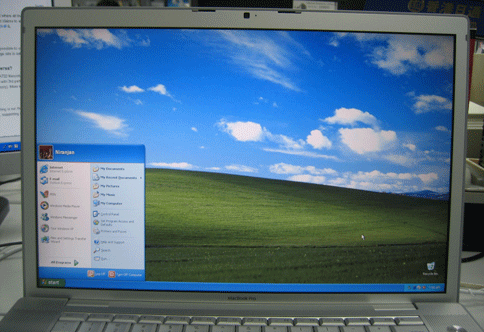
Finally I’ve succeeded in installing Windows XP in MacBook Pro. Now it can dual boot between Windows XP and MacOS X. There’re few issues with windows xp but being able to boot smoothly between these 2 OSes are really amazing. I’ve followed this HOWTO where more and more information is being added every few hours. I think most of the minor problems will be solved soon. If you want to install it for your self or want more information this wiki is the best place to go. Here I’m posting the photos of major installation sequence and some problems I encountered.
Installation
1. Downloaded winxponmac0.1.zip
Windows XP Pro CD that came with my Samsung Notebook is SP1 but the patch works only with SP2. So this is what I did:
2. Downloaded WinXP SP2 separately.
3. Used the free tool nLite to integrate the WinXP SP2 with the XP Pro CD (SP1) and created the WinXP SP2 CD source.
4. Then followed Step-by-step-instruction
- Burned the customized WinXP CD.
- Partitioned the disk using OSX CD.
- Installed OSX.
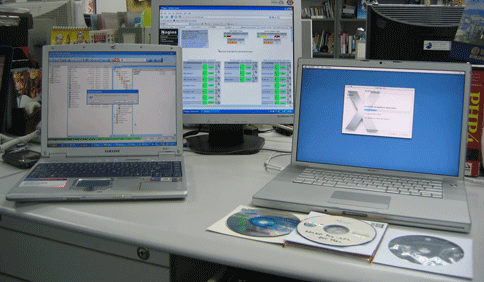
5. Started Windows XP installation.
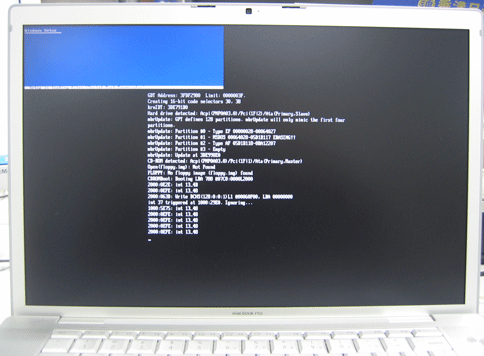
6. I encountered a problem with the partition listing. I was presented with following options.
- C: Partition 1 (EFI) [FAT32]
- unpartitioned space
- E: Partition 2 [unknown]
- unpartitioned space
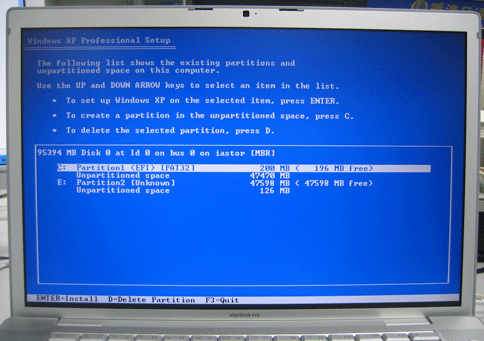
According to the guide the correct option should be as following:
- E: Partition1 (EFI) [FAT32]
- C: Partition2 [Unknown]
- F: Partition3 [Unknown]
If you choose the Partition2 then you’ll get follwing error:
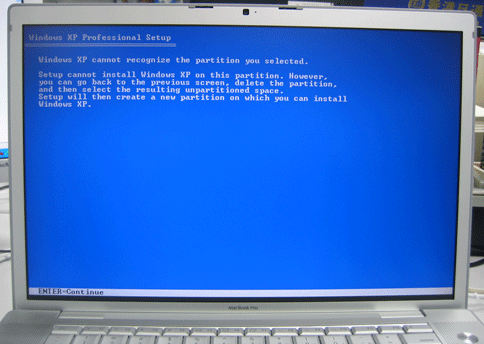
7. To solve the above problem I selected the first "unpartitioned space," then pressed "C" to create a new partition. As described in this solution. After this things went smoothly.

8. Finally it’s installed
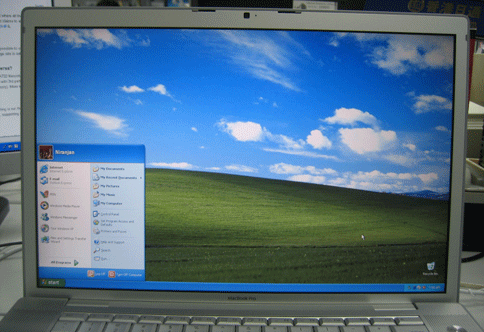
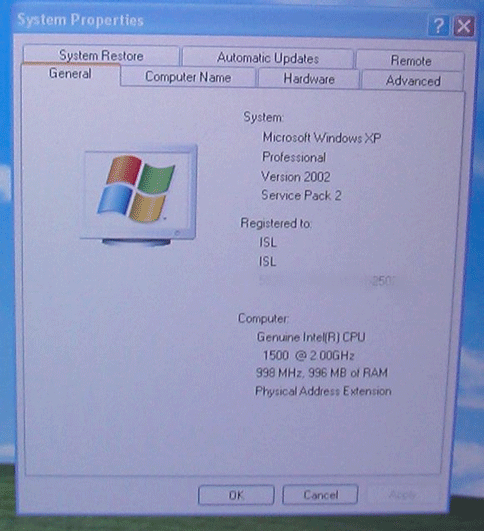
9. System Properties
10. Device Manager with unrecognized devices.
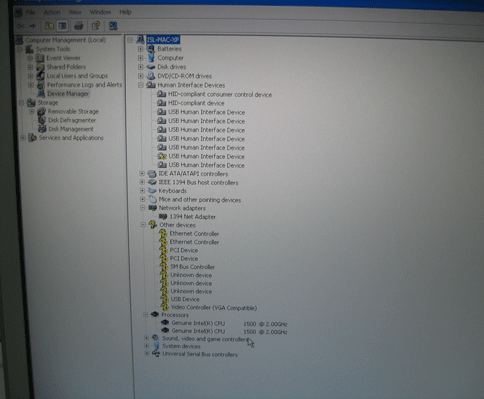
11. Downloaded the drivers from here. Ethernet works fine. Wireless doesn’t work. Wireless also works. If I press restart it will shutdown.
12. Browsing my blog.
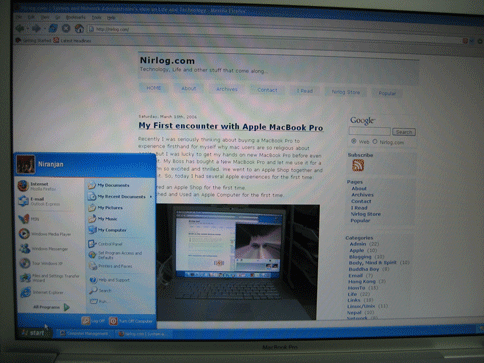
13. Boot Choice: Mac OSX
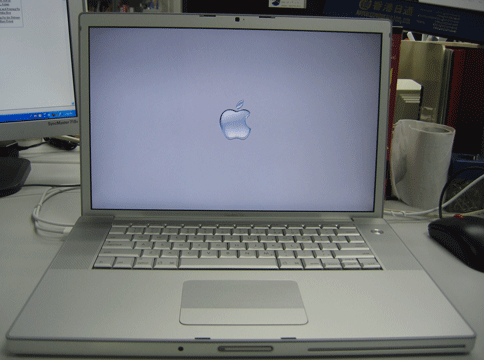
14. Boot Choice: Windows XP

Now there’re few driver issues I’m quite sure they’ll be solved soon.
Update: You might be interested to check What’s next for Intel Macs?
If you want to try for yourself and support this site consider buying intel Macs from Amazon:


iMac 20 inch iMac 17 inch MacBook Pro 2GHz MacBook Pro 1.8GHz




Why is everybody in a rush to do this? Just curious!!
I thought the whole reason of buying a MAC is to get away from Windows..
Sorry for my ignorance on this issue…
You are correct Chamel.
@ Chamel:
So you can use OS X for your daily activities and then switch to XP for any apps that are windows only. Also, a lot of companies require certain software on the laptops, aka windows only. This enables a machead to use a macbook and still have the company-required software 🙂
Hopefully by the time the intel ibooks/powerbooks come out I can sell this ppc iBook G4 and join the ranks with the other dual-booters. I need to wait for a tri-boot machine: Windows/Linux/OS X with all the drivers working perfectly. That would be FANTASTIC to say the least, :9.
because there was a $13,000 reward for whoever done it first but it has been givven away and we need windows for half lfie 2
And because most apps don’t run fast in VirtualPC.
…to be able to do the most you can with what youve got
if your car could do 900mpg and also go 1000mph with a little work im sure youd do it
G A M E S
I did this for fun but I totally agree with Ryan on the usefulness. I’m very new to OS X and if dual or tri-boot is seamless It will make my switch to Apple a lot easier and I think there are many users like me.
Chamel:
Two reasons; there was a $13000 pot to be taken by the person who first did this successfully (it was smaller, but people kept donating to it. Also, because moving cold turkey to another OS can be a bit of a shock. Think how annoying it would be to have a laptop running MacOS and not be able to use that one piece of software you ocassionaly use that requires windows? If you have a desktop, one can assume your at home and more likely have access to a PC somewhere in the house. If it’s a laptop and your on the road, you’re just stuck. Either you run VirtualPC/VMWare (slow, no Direct3d for gaming, but no reboot required) or you run Windows directly on the hardware after a simple reboot.
Mac with dual boot windows is the best of both worlds. You get the MacOS you like, but have the option to use Windows so you aren’t caught with your pants down should you need it.
Wireless DOES work (I’m commenting from it right now), follow the instructions at wiki.onmac.net on the Drivers page
can this be done w/ new mini? too?
I really think this is good, I have been thinking of buying a mac, Probobly will not be a powerbook, because they are soo exspensive so I will probobly get a mini within a year and test this out. I probobly will not keep windows on it but I will give it a good try just to see how it works, I love doing this kind of stuff.
PEACE
>>..can this be done w/ new mini? too?
Yes… still has driver issues (like the other mactels), but here’s the current macbreak special:
http://twit.tv/mb4
Thanks for all the replies.. I am enlightened! : )
Awesome.
In the future, I hope we can run Windows as an OSX application rather than an OS. This would be similar to Virtual PC but better because of the X86 chip aboard the CPU.
The reason to do this is, if I can run Windows and OSX for specific uses, then you get the best of both and don’t get stuck using applications that are compromises.
For instance, using Final Cut is prefered to Adobe Premiere by most these days. You can’t buy Final Cut for a PC though. And on a PC, there’s a ton of freeware that doesn’t exist for the Mac. Email applications that work with a Microsoft Exchange server can work better in the Windows environment because Outlook will share the calendar, but Entourage doesn’t (or at least we haven’t gotten that to work yet.)
Even better than Windows as an app – I just want to run emulated windows apps within OS X – without windows! I’ve had this for a long time with Crossover Office for Linux (basically, just a niced-up and business-aimed distribution of Wine), and I’d love to see the same for OS X – not dual boot, no Windows-in-a-window, just that one silly Win-only app, running happily on my MacBook. 😉
This hurts my eyes & soul.
Why? Because until we have Photoshop and company go Universal Binary, Windows is the best option.
so people just buy a new license of windows ?
i guess microsoft will be happy, all these mac user buying their windows 🙂
Well done to all who worked on the project!
—
http://www.wirah.com
As the emulator front goes I think darwine works on (much the same way wine does on linux)
this is (almost) “heresy”…..:)
good article.
thanx.
It works well! Great Post!
Why do you have an expensive Mac machine if you (now also everyone on the earth) want to install windows on it????? if you have a mac run osx on it.. if you want to have windows just buy every cheap hardware you need.. everywhere… this is the same shit as everyone want to install linux on xbox or make a pc from a PSP….
Mike… you’re missing an important part of it. If I must use OSX for somethings, and Windows for others… it’s a hell of a lot cheaper and more convenient to own one box that does both.
Way to supoprt the mac platform under OS X, buy a PC game, dual boot your Mac to XP and enjoy Half Life 2 while developers ask, so why should we create an OS X version of our software.
OK – So its ok for now…
i think this is more for people only joining the mac community in the last few months. as most ‘die-hard’ mac people i know actually couldnt care less about any of this, “XP on my G5/MBP/IBook?! Get the F*ck outta here!” i can imagine the exact same will go for the average consumer who are drawn by the relative security of macs and the ilife suite. erm.. to coin a phrase… once you’ve tried mac, you dont go bac…(?)
Just remember – somebody is going to have to come up with a new crack everytime Apple release a new security update/revision of their OS – because you can bet your life they’ll be sure to ‘break’ the dual booting. unless of course you want to live with the same mac OS as you have right now with no updates… plus, until you can actually go out – buy a ‘real’ boxed copy of XP and go ahead and install it – this will never have any broad based appeal apart from within the Nerd-Illuminati™…
enjoy it for what it’s worth, and for however long it lasts…
It´s the best ever… I used to have a PC and a Apple because a like alot more to use OSx
For all graphic design stuff, but for the 3D i had to use windows… there are lots of software on PC that doesn´t exist on OS X.
I need a laptop for use when i am not at work, and to have a Powerbook pro
(that is the best laptop), i can use all my programs everywhere…
I its more that a $13000 contest… It really helps in alot of ways. And I am sure it will help lots of people like me o work…
Thanks
I don’t think Apple has any problems with people running XP on their hardware. After all, they’re primarily a hardware company, with Mac OS being the very nice “carrot” making people buy their hardware (I’m not calling anyone any names, my laptop is an iBook). What they DO have a problem with is people running Mac OS on non-Apple hardware. Apple almost died when (a long time ago) they licensed their software to run on “cloned” hardware. I think they learned their lesson then – but they do need to make it more difficult for people wanting to patch Mac OS to run on non-Apple hardware – perhaps they should hire some of the guys that always manage to find all the loopholes? 🙂
Need to run a windows only program on my Mac Book Pro. Virtual PC 7 will not run and perhaps this will solve my problem. The WHY for those who asked: I have a windows only program to run my office desktop trading platform remotely, and I would like to otherwise only use the Mac. Please reply if anyone can help me. 800-922-0899 weekdays.
Why put XP on a Mactel? ‘Cause you can’t put OSX on a Wintel!!
Best of both worlds, I would not seriously pursue getting a Mac cause so much of my stuff is Windows dependent. Now I have the option open.
ooh, ooh, ooh. no luck with the graphics card then? Because the only reason I’d do this to a mac would be to play Games. What does the Graphics Card Show up as, try Run > Dxdiag. Anything?
I wonder if you could throw a Vista Beta boot DVD in and ‘upgrade’ from this point… hmm.
I will be moving to a media/technology team in a of couple months.
The team provides a laptop for each member and I will have my choice between a PC or MacBook.
I’ve only ever used a PC and was in no hurry to switch. I’m also concerned about the need to use windows-only tools for programming. But knowing now that I can dual boot (along with all the other advantages of OS X), I’m leaning towards getting the Mac.
If you guys havent herd, but I guess apple has been putting money and research into the existing emulator “wine” they will be able to get it down to where u can run any OS you would like without out the slowness of a regular emulator like virtual PC. So instead of just dual booting you can play video games on windows at full speed, you will never know that your using an emulator for it. This is one of the many reasons why they changed processors.
This may be a stupid question, but will an XP home sp2 disc work? Or, is Pro required. Thanks.
ShaunC:
Currently it works only with SP2 Pro but that might change soon. FAQ
Update:
I also got wireless working now, disabled the Hardware Acceleration in the advanced Display Properties settings (as recommended in drivers page) which improves the quality of display. Now searching/waiting for display driver so that we could try some games (maybe) 🙂
Gellato:
I think you are way off the mark.
I’ve been using Macs for years, but as you can see from this board, ALOT of people still need to use one or two windows apps, even if it’s just for their job and they prefer using Macs.
I have a feeling Steve wont like this, and ‘Apple Legal’ will be quick to find a way to stop Windows on a Mac. As for the idea, it’s a good one, I would love to run AutoCad on my mac.
Finally, some ways of thinking…
First, the question in not WHY, but WHY NOT? Being simply old fashion Mac user needs more explanations and justifications than being an explorer of the different OS possibilities. Think different, that meens also about Apple, no?
Second, Apple and MacOS X are leaders in some businesses, Microsoft and Windows are for others… And it’s not to change in a soon future. The end users that we are have not to pay their constent war of enemy brothers. This possibility feels like “good” liberalism, not so bad this time.
Third, who never been frusrtated because Wintel world can play Final Fantasy Online, for exemple and Mac world could’nt? If developpers would start to develop “crossplatfomly” their products, no way to think about all that…
Fourth, If you can freely install a Linux like Ubuntu PPC on your iBook G4, why could’nt you install a Legal license of Windows on your MacIltel? If people want to limit themselves to one world, as they wish. If we want to experience every possiblilities of our hardware, just let us enjoy it…
Fifth, If we can run Win on Mac, Microsoft is happy so sell, so this part goes, because they do not sell hardware… But if Mac OS runs on IBM compatible, i think Apple should loose a great part of the market, and stop perhaps their activities as known now. Buying a MacIntel is the smartest way to use every part of computing world…
Thanks
Mmmm now let me see what Win apps would I need to run on my mac, er none, so win xp won’t be polluting my sweet little macs, as I have a crappy greybox under mu desk for that.
Actually, I suspect that Microsoft is potentially less than happy about this. They would dearly love that Windows not be bootable on Macs for the simple reason that they have now lost a potentially very large chunk of their Mac revenue stream as a significant number of people who would otherwise have bought Virtual PC when it finally became available for the intel Macs, will no longer have to. MS is never going to be happy about a reduction in their profits and this will probably lead to a reduction in their profits. Their own fault of course for not planning ahead and having VPC ready for the intels in a reasonable time frame.
Just in case it isn’t clear – I am not saying that there isn’t a market for VPC on the intel Macs any more, there still is as many people who will be using Windows apps frequently will definitely prefer a virtualisation solution over a dual-booting one. I am just saying that the market has now decreased in size because the people who only need to rarely use a Windows app will save themselves a lot of money by just buying (or even pirating) a copy of Windows and booting into it on the rare occasion that they need to.
I love this, now I can get rid of my horrible looking Dell SFF PC and get a nice, cute Mac Mini!
Does anyone know if this works on the Mac Mini Duo and uses both cores?
So what about the Fan Driver issue? Any heat concerns… ie. playing Half-Life and toasting your CPU all at the same time?!
I don’t understand all the “why would anyone want to run windows on a mac”-crap. Obviously there is a huge demand. Personally I’ve been using Macs since the Mac Plus, and I’m a hardcore mac enthusiast. However, in my work I have to use certain pc applications that are not avail. for osx.
Now I can use the same computer for everything instead of having to carry around an extra (crap) Dell laptop and I can throw out my desktop pc at work.
I know I know… in an ideal world, there would be no companies that required their employees to use software that works under windows, or really, there would be no Windows at all…
And I think this makes a good argument when talking to people about switching to OSX, I mean, now when PC friends of mine are whining about about how “different” OSX is, I can show them I have the choice of running both OSX and XP on this hardware, and my choice is still always OSX.
When all the (driver) issues are worked out and it is proven to be fully functional this will boost market share for Apple in the education market. We buy both Lenovo (IBM) and Apple computers for our school board. Now the school board will only have to purchase one computer hardware brand (apple).
I like to use Garageband, Hyperscore (www.hyperscore.com) and Piano Suite (www.adventus.com). The last two are windows only and will not run in Virtual PC due to lack of 3D video. I will now be able to have one computer hardware platform to use with students.
As for accessing files from the Windows partition from OSX, can the Windows partion be formatted as Fat32? If so, then you should be able to acess files from the Windows partition when using OSX.
there is still one huge thing everyone is missing.
remember the days when there was that guy that just kept on coming up with hacks for itunes music store / drm protected music?…
everytime apple updated itunes it broke the hacks.
back to square one.
now look at the situation. – this isn’t even a legit copy of XP! – its a hacked copy. so if you install it now – on top of the current mac OS – is that it?… do you never want to upgrade your OS again? because when 10.4.6 (or whatever) comes out, and you install it – do you think this hack will still work?.
do you think when you install the next big jump in the mac OS – or even vista, this hack will still work?
what happens when adobe, or any other software manufacturer updates its software? and it ‘just wont work’ on top of a hack? or on a machine that simply has a hacked OS ‘lurking’?
back to square one.
as of now, i can’t go out and buy a copy of XP and install it on my MBP – and keep uptodate with software. i’ll void my warrenty if i install the hack. i have no comeback if the hack causes my MBP to go to the wall. in fact, if i install this hack, im locked into ‘right now’ with pretty much no legit upgrade path.
seem’s like it would fast become a royal pain in the ass, just like having to work in a windows environment.
I think the people talking about illegal copies of windows seem to have little experience with the licensing.
A copy of a Windows installer is just that, without the serial number and your certificate of authenticity its just an installer.
As long as you hav a legit # and cert, you’re legal to install it on any box you want- as long as its one box per license, M$ is no more angy about this than they are when you build one from scratch.
Apple ties their license to their hardware, you dont have an OSX license, unless you have an Apple Computer AND the original installer disc.
Hence why OSX on generic X86 will be “bad”, but XP on CoreMacs will be Good.
One way Apple sells nada, the other way Apple sells Hardware and software no matter what software you install.
Financially- everyone wins with XP on Mac, noone wins but the 3rd partys when you put OSX on generic X86(except the bargain basement builders)
-Hoop
What I see here is the perfect marriage between good hardware and software. The Macs are extremely well designed and the OS is pretty nifty to boot to say the least. What i would like to see is an end to all poorly designed computers out there: The boring, classical, drab coloured boxes that sit on most of our desks. Think about what this could mean in the future…. any OS on the most beautiful Computers ever built!!! 🙂
Few things I would like to add since I’ve received a lot of emails asking for it.
Q1:
How did you make the sp2 cd from sp1? More details please.
Ans:
1. download and install nLite.
2. download winxp sp2 from Microsoft site.
3. copy your winxp sp1 (all the contents from cd to hard drive).
4. run nLite and integrate the downloaded sp2 with the copied source of sp1 (http://www.nliteos.com/guide/). The software is very easy to use and steps are self explanatory.
5. Now you’ve created a slipstreamed win xp sp2 source.
6. Follow this HOWTO http://wiki.onmac.net/index.php/HOWTO
Q2: How to solve the partition problem with MacBook Pro?
Ans:
1.Select the first “unpartitioned space,” then pressed “C” to create a new partition.
After that just TURN OFF the macbook pro pressing power button. DON’T FORMAT using the windows installer yet.
2. After the reboot you should see the partition layout according to the guide.
3. Follow the guide.
Q3: Aren’t you worried about getting you MacBook Pro toasted?
Ans:
No, it’s been verified that the fan is working under Windows XP.
Q4: Aren’t you worried that Apple will break the dual boot and using WinXP in Mac is not legal?
Ans:
No, I’m not worried because if Apple want to break it let them do it. This is not my production desktop. I’m doing this for fun :). About the WinXP I’m using my own copy.
Well, I think wine could be ported to macos now it has the same underlying architecture which would eliminate the need for dualboot wouldn’t it?
I hope it can be ported anyway, dual boot is a weak solution.
5 golden manbabies to you good sir. I for one welcome our new dual boot overlords, fiestacast-a-licious.
Is this compatible with black people?
Does this mean I can run Notepad and Safari on WebTV? I like to check my email on the internet sometimes.
Is it still true that the fan function under Win XP does not work?
Well i guess they do work fine
How about the other way around… running OSX on a PC??
How come babies swim so good when they just borned?
You can also currently run windows xp as an application within osx on an intel mac. The product is called Q, it’s the osx86 version of QEMU plus a really REALLY nice gui only available on osx86.
I’m using it now to run windows xp sp2 on my macintel. It’s about as fast as vmware is on a linux host when you install windows xp pro as a client os. In other words, you can’t run games in it really, but it’s great for business applications when you need them (if there isn’t an equivalent for OSX intel available). Also good since it’s somewhat faster than rosetta for things like photoshop and illustrator – they run natively in windows under Q on my macintel, but they run in emulation on my osx machine as mac versions. Sort of wacky huh?
Q is free and available at:
http://kberg.ch/q/index.php?sid=254368&p=0
you need to download the latest UNSTABLE build, NOT the stable one (Which is ancient and wont’ install any windows versions at all). version 871 and I’m sure future versions install windows xp perfectly, but it must be xp sp2 and you must have valid key etc.
there’s nothing like running windows as an application under OSX – the coolest thing in the world to see on your monitor. Puts windows in it’s place heh heh heh
good luck!
oh yeah, and to the guy who asked “how about the other way around, osx on a pc”, it’s been done for months. Thousands of people use OSX every day as their main operating system and it’s running on their dell pcs or home built pcs. I even have a blog about it online…
anyway, check out http://www.osx86project.org for a forum all about it, or go to maxxuss.tk for information directly from the brain of the hacker who brought OSX to the rest of us. There are lots of downloadable dvds of it as well, but highly illegal to post about that of course so I’ll let you figure out how to break the law if you choose to do so.
Cheers
Do you see a question mark for a split second right before the shiny Apple logo appears? I see that on my MacBook, but I don’t see it on any of the videos showing iMacs dual booting.
How does it run? The speeds how do games or video fare on this laptop?
Werd! Thanks for the post. I’m UP! Or Down! (depends on which social circle is reading this)
Peter:
yes, the question mark appeared before the apple logo but it’s gone after installing the Chipset driver.
I have put osX on my IBM Thinkpad r40.
Has anyone tried to install the new 10.4.6 on their Macs that are now running Windows as dual boot?
does windows still work after the update?
Jeg hilser til klovnen. Jeg liker klovner veldig godt! Jeg har vört põ sirkus og sett klovner.
so, since itunes uses your ethernet MAC address for authentication/machine identification, does your dual boot macbook pro count as one or two computers?
Your blog is interesting and informative. Thank you
Pretty neat solution I agree, though there is a better one. I’ve been using the Parallels virtualization solution since beta 1..it’s now on beta3 and I have to say… I think it knocks the Bootcamp solution into a distant second. I’ve got two virtual machines on it- both performing flawlessly on on my MacBook- and with Beta 3 fedora core 5 is stable too. I’ve posted some pics on my blog at http://blog.sheddan.co.uk – the performance is near enough native speed- if I had to guess I’d say as fast as my old Toshiba Centrino @ 1.4ghz, if not a little bit faster. The beta testing process seems to be very feedback orientated, with a new beta appearing regularly.
There promising the ability to run the virtual machines in full screen, as well as have multiple machines open. Machines fire up in under 20secs (a little longer for fedora- what with it running through all its startup gubbins). Once machine is up and running both it and OS X run smoothly. It’s only $39.99 (with vat its around £34gbp) and with the companies forward focus and constant inovation and improvement I think this product will only get better and better.. I can’t recommend it highly enough.
This 17′ Macbook Pro is out! It has better resolution. I think it will work even better with Vista.
Wow, this is very cool!
I definetly have to try this when I get my Mac book pro!
Hello
Has someone found other drivers for the macbook intel ?
like the webcam or Video Controller Driver
thanks & bst rgds
I just came upon this site while I was trying to partition my mac. Very Thorough, thanks!
Hey! I am going to buy a mac book i think is good enough but i just wanted to know about the games, if a create the partition in my hard drive i could play the games without a problem using windows? the performance of the computer changes too much using either of the OS??
This is a great step to setting up a machine to cover all bases, thanks for the great info.
I like Mac’s because of the security, photo editing speed, etc but since most applications I work it, since my career is in IT, I need to be able to work with Windows. Having a dual boot Mac is the ultimate setup in my opinion. I foresee a MacBook in the near future rather than a new PC based IBM or whatever.
Hello guys i would like ask u question one thing. Can i boot to window on my laptop is ibook g4.
it is cpu speed is 1.3 and memory is 512mb and 40 gb. Do u think my laptop going work??
can you also dual boot xp and osx in macbook? not the pro one. because it also has intel right.
Muju:
you cannot boot windows in G4 natively, but can install windows on the Virtual PC inside OS X (this would be very slow although).
Russcal:
yes, you can dual boot xp and osx on macbooks too! now the there’s Bootcamp from Apple!
Help…..I installed boot camp and tried to install Win xp Pro on it and i get to the
point where it wants me to hint “Enter Key” to continue installing, Key obard dose not respond.
Tried to use USB Keyboard it still dose the samething. The worset part is that when i boot it it looks for the CD and wants it to install i could not even go back to the MAC OX 10.4.7 to boot up.
appreciate the help
Thanks
Brian,
I’m not sure what’s wrong with your installation, can anyone help him? Here is the Boot Camp FAQ from Apple, hopefully it will be useful to you. The installation requirements among other things are, latest firmware update for your intel mac from apple, and you can only install winxp sp2 (no sp1 or earlier).
PLEASE HELP!!!
Do we need 2gb ram on the Macbook black to run windows with parallels along with mac os. Will it be really slow if I keep it with 1gb. Do I need to updgrade to 2gb. Please respond back asap
Jerry,
Definitely you should go for 2GB. I’ve tried Parralel’s Coherence in MacBook Pro, with 1GB RAM, and can tell that it’s still slow to switch between OSX to WinXP applications.
I hope this response is fast enough 😉
so has anyone played Half Life 2 in WinXP on their MacBook pro yet? Seeing this article..and hoping to play Half Life 2 on my MacBook pro is the only thing keeping me from selling my MacBook.
Hey there,
I’ve just bought the 17″ Mac Book Pro with the 2GB RAM. I’m going into a new contract next month where the company only supports Microsoft. OS, unlike my current contact where they support Miscrosoft, Mac, Solaris, & Linux.
I bought the Mac Book Pro for a few reasons being able to dual boot. I need to use both OS for different reasons, for my business and for hobbies.
My only concerns with my new contact is the VPN software the company provides. As they don’t support Macs, I have to get Windows XP Pro on there. Has anyone had an experience with VPN connectivity through XP Pro on their Mac Book Pros?
Any other advice should I know about?
Thanks
Hi Terry,
congratulations with the new purchase. For the VPN you might want to look at VPN Tracker (I haven’t tried it myself though). If your company is using IPSec VPN then they promise compatibility with over 300 VPN firewalls devices. BTW, PPTP VPN is built-in to OSX and works flawlessly.
In my experience, it’s fine. I tend to run XP in fullscreen mode (boot powered by Parallels). I get occasional XP crashes, which I can escape by restarting or “powering off” the virtual XP machine, which takes me back to the Mac OS. Then, I can restart XP if desired.
My biggest practical problem is getting really familiar with the Mac key/command sequences. Practice, practice, practice – and it’s fun!
Is it revesable?? IOW using same process can i put osx on intel?
ok…
here’smy problem….I’ve install XP on macbook pro and now OSX wont boot anymore and canot install it back again…????
I am new to mac so if I am missing something
can someone tell me cause this is getting to my head right now!
wanted to update the firmware but cannot start the process….I think I need some help!!!
anyone had this glitch too???
anything could help I am sure!!!!
thanks
hi alle can i help my ay have problem and my macbook pro because ay have instal win xp and my leopard mac is delet from pc how can help my how ay do tahks ay want my leopard back and my pc
I want the opposite of this HOWTO, I need to install MacOSX on WinXP computer, i.e winxp is already installed, and I don’t want to lose anything there, and then to Install MacOSX, and to be “able” to choose the boot system.
Hey!
Got 1 problem, i got a macbook. And i run win xp on it. But the problem is i dont know how to adjust the brightness & contrast. Cause the comands on the keyboárd arent the same now. Usually its – and + key that you push on but they dont work now.
Would be gratefuk if someone could tell me how i shall do it?
Thanx!
*grateful ;P
I have Windows XP Pro SP2 CD.
I tried to follow howto. but it has failed..
I running this procedure with my MacBook Pro 2GHZ
Please help
Had to do a reinstall on my Mac Pro after upgrading the hard disk drives, so thought I would try putting XP on it before i put OSX back on it ready for work again. I just used the XP CD from my very old Sony Laptop (back in the day when they did give out an XP CD) and after a few hours managed to get it on after reading though various guids on the internet.
I installed Adobe Photoshop CS3 as I have a windows copy on my laptop too, and am a bit annoyed to see that XP seems to my eye to run CS3 a bit faster. I regally scan 5×4 negatives at high resolution, so am working with 1GB+ files most of the time, and for the usual procedures I perform after scanning in the negs it definitely took less time than it normally would on OSX……….
I have read many posts from programers on the net voicing frustration that OSX is not especially optimized as it could be for speed………maybe they could actually be some truth in it.
Does winxponmac work for WinXP SP3 discs also?
please i got a macbook pro passworded and i want to install mac osx on;were do i get this os installer.
I went ahead and partitioned my disk. When I am on the mac side, is there anyway to edit the files on XP side? I am able to see, even open the files, but I am unable to write new ones to the XP from mac. It just says that “desktop” cannot be modified. Thanks!
i installed windows xp on my macbook pro… the windows screen is all stretched though (horizontally to fit the widescreen) any idea how to fix this?
The reason for dual boot is if you are a developer, administrator, or Net Admin.
You need to test whatever you did on windows or if someone has an issue you need to be them and test it.
Grow a brain…….
is it possible if only windows xp will be installed in your macbook pro?is there any something wrong will happen to the capacity of your macbook?
Hello !
Pour ceux que ca intérèsse on a publié un article récemment sur du dual boot Mac + Ubuntu 10.04 !
( http://www.geckogeek.fr/double-boot-mac-os-x-et-ubuntu-10-04-avec-refit-et-bootcamp.html )
Bonne semaine !
Vincent
Hey man, thank a million.!! Tutorial in conjunction with another one I found worked awesome!! 🙂
How to Dual and Triple Boot Windows 7, Apple Mac OS X and Ubuntu 9.10 on a Laptop/Computer
You should check it out too, and maybe adapt it :), but thanks a millions bro! OH YEAH
How to Dual and Triple Boot Windows 7, Apple Mac OS X and Ubuntu 9.10 on a Laptop/Computer
We have examine some great stuff right here. Worth bookmarking for revisiting. I wonder what amount effort you put to produce this type of impressive beneficial web-site.
This is exactly the information I needed. Appreciate your writing this posting.
These are actually great ideas in on the topic of blogging. You have touched some pleasant points here. Any way keep up wrinting.|
Um, I’m not trying to burst your blbbue, but that’s not a Fifth Generation device, it’s just a White Upgrade, the screen is better than the Black one though, and it has a new light sensor, but other than that, it’s just an ordinary iPod Touch 4g.
Pretty element of content material.. Οικονομική και γρήγορη επισκευή MacBook. Χρήση των καλύτερων ανταλλακτικών της αγοράς με εγγυημένο αποτέλεσμα από τους έμπειρους τεχνικούς μας. I stumbled upon your website plus accession money to mention that we acquire actually appreciated accounts your website threads. By any means I’ll be subscribing to a person’s bottles as well as I actually fulfillment you will get perfect associated with admittance to frequently rapidly.
I have noticed you don’t monetize your page, don’t waste your traffic, you can earn extra bucks every month because you’ve
got high quality content. If you want to know how to make extra $$$, search for:
Boorfe’s tips best adsense alternative